
Autodesk ForceEffect for iOS : Interactive force diagrams

Yesterday, I installed a new (and currently free) app from Autodesk onto my iPhone, called Autodesk ForceEffect (check it out in the App Store).

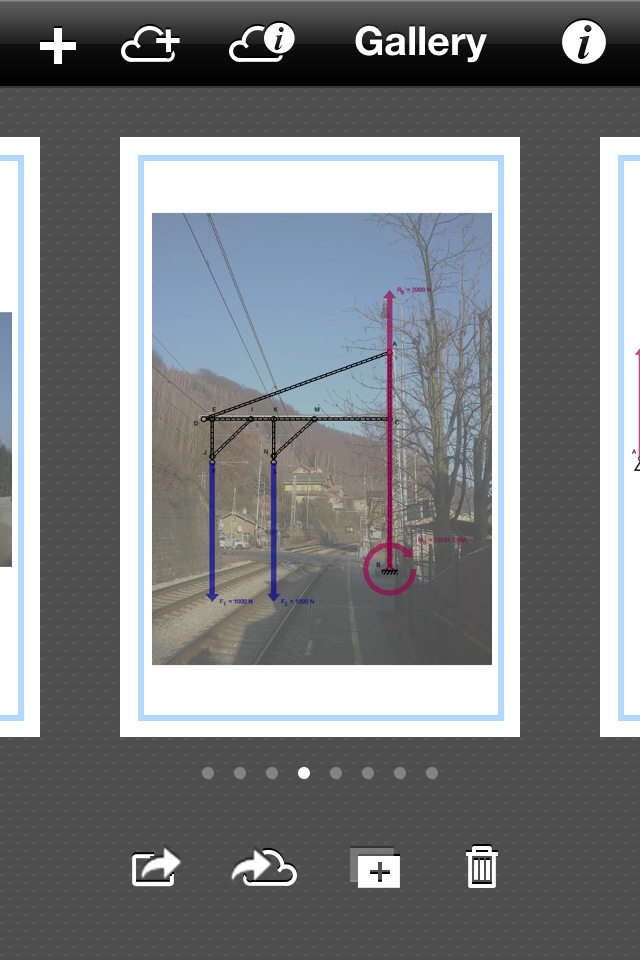
With this app, you can draw a 2D schematic of beams, nodes and forces. It will allow you to quickly assess the reacting forces into a structure. The examples included with the app also show you that a photograph can be used as an underlay, to sketch on top of them, e.g. to check a structure in the field.
Gallery showing diagram over photo background
While the iPhone screen is quite small for my not-too-small fingers, it works quite handy: there are automatic guidelines that constrain the direction and alignment of nodes you draw. You can switch units between metric and imperial and use gestures for scaling (pinch), panning (two finger swipe) and editing (single touch). Moreover, while it is hard to sketch an exact size for a truss, you can fix the length be entering the exact value on the dimension line and this will be enforces, even when you start moving nodes around.
Draw nodes and forces with your fingers
Click on a truss, and you get the acting forces (in color, with direction to show pressure or tension).

You can generate a report, which could be used to help you enter the exact nodes and sizes and forces in a FEA software afterwards, when you want to go a step further.
Automatic Report
This is exactly the type of app I would have loved while being an architectural engineering student, quite some years ago. It's intuitive, interactive and free (for the moment?). You'll need an iPhone, iPad or iPod Touch to be able to use the software, but I wouldn't be surprised if they will port it to other devices in the near future as well.
Comments

Popular posts from this blog

Improve usage of BIM during early design phases

When I was collecting ideas for a book chapter on BIM (that seemed to never have emerged after that), I collected 10 ideas, which I believe still reflect good recommendations to improve the usage of BIM during the early design phases. These ideas are related to BIM software, but you can apply them in any flavor, as long as you can model with Building Elements, Spaces and have control over representation. Introduction This article gives an overview of several recommendations and tips, to better apply BIM applications and BIM methodologies, in the context of the early design phases. Many of these tips are applicable in any BIM application and they are based on experience gathered from teaching, researching and using BIM software. Sometimes they could help software developers to improve the workflow of their particular BIM implementation. Tip 1 : Gradually increase the amount of information In the early design phases, the architect makes assumptions and lays out the main design in...

PythonOCC : Open Source interactive CAD shell (and how to run it on OSX)

What is PythonOCC? PythonOCC is an Open Source (LGPL) Python-wrapper for OpenCASCADE. So what is OpenCASCADE (OCC)? This is an advanced Open Source (custom license) modeling kernel, comparable to commercial engines, such as ACIS or Parasolid, which are used in quite some commercial CAD programs. When you want to develop CAD software, you could use OCC and write programs in C++. And why using Python? With this wrapper, you can create CAD and geometry scripts in Python, which is an interpreted Object-oriented scripting language. You can write almost "on-the-fly" and seriously reduce the implementation effort, by skipping the compiling-phase. You can even interact with a running program in the Python interpreter. Want to read more about this? The OpenCASCADE official website  (currently Linux and Windows are officially supported) The PythonOCC website/blog  (beware that the core of the actions happen in the development repositories). So far so good. Now the nasty, techn...

Getting BIM data into Unity (Part 8 - Strategies to tackle IFC)

This is part 8 of a series of posts about getting BIM data into Unity. In this post, we’ll discuss IFC as a transfer format towards Unity. As with the previous post, this is not a coding post, although hints and examples are provided. Open BIM and IFC Everybody who ever met me or heard me present on a conference or BIM-lecture will not be surprised to hear that I’m a strong believer in the Industry Foundation Classes (IFC), an open standard, with already two versions published as an ISO standard, being IFC2x2 and IFC4 (but surprisingly not IFC2x3 which is widely used). In the ideal world, this would be the format to use to transfer BIM data into another environment, such as Unity. So what are our options? Looking in the Unity Asset Store Assimp is a library which supports multiple formats, including IFC. https://assetstore.unity.com/packages/tools/modeling/trilib-unity-model-loader-package-91777   I did a few attempts, but alas without any success. It is po...